LG Dryer D80 Code: Clearing the Vent Blockage
Quick Answer
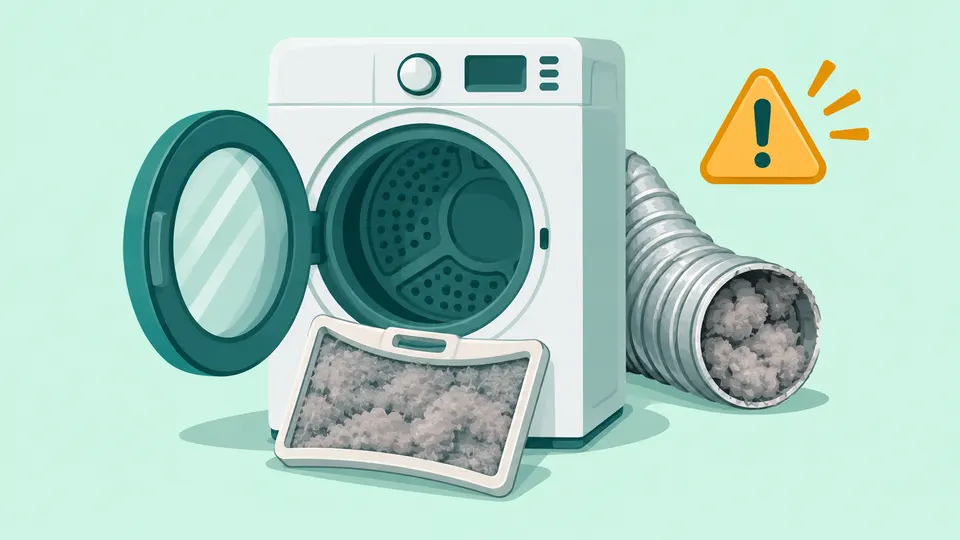
A D80 code on an LG dryer means its Flow Sense system has detected an exhaust duct that is about 80% blocked. LG's fix starts with the lint filter, then the duct behind the dryer, then the vent flap outside. On gas models, d80 can also point to a gas supply problem. If the code survives those checks, the ductwork inside your walls needs a vent cleaning professional.
On this page
Key Takeaways
- D80 is a warning from LG's Flow Sense duct sensor: the exhaust path is about 80% restricted. d75, d90 and d95 are the same warning at 75%, 90% and 95%.
- Most causes are lint or a damaged duct: a full lint filter, a crushed or coiled hose, a loose joint, or an outside flap jammed with lint.
- LG Canada says the code clears by itself on the next cycle once airflow is restored.
- On gas dryers, d80 can also mean the dryer is not getting gas. Do not disconnect the gas line yourself; call the installer or LG service.
- Lint is a fire risk: the U.S. Fire Administration lists failure to clean as the leading factor in home clothes dryer fires.
What does the D80 code mean on an LG dryer?
LG dryers with Flow Sense have a duct blockage sensor that watches how freely hot, moist air leaves the machine. LG's error code list says a d75, d80, d90 or d95 code "indicates that the dryer's exhaust duct is clogged" at 75%, 80%, 90% or 95% respectively [1]. LG's pages write it in lowercase as "d80". The code applies to LG dryers whose control panel has a Flow Sense indicator icon: LG Canada says any lit bar on that icon signals the warning [4], and LG's U.S. list says two or four bars mean the exhaust system is severely restricted.
Two details matter before you start cleaning:
- Gas dryers. LG adds that on gas models, d80 "may also indicate a lack of gas supplied to the unit" [1]. We cover that case in its own section below.
- The dryer may stop. LG Canada's Flow Sense page says poor exhaust can make the dryer shut down to keep it from overheating [4]. LG's U.S. pages do not say whether every model stops, so treat any of these codes as a reason to pause and check the vent.
One trap on LG's U.S. code list: a section headed "D90" there actually describes a washer drying-function error with a 10-second unplug fix. It has nothing to do with dryer venting, so ignore it when you read about D80. If your code is a different one, our error code lookup shows what it means by brand.
What causes the D80 code?
Every cause LG lists is something that slows air leaving the dryer. Some sit in the machine, some behind it, some outside the house and some inside the walls.
| Where | What LG says to look for | Who fixes it |
|---|---|---|
| Lint filter | Lint left on the screen between loads; residue on the screen | You |
| Load size | Loads too large for air to pass through | You |
| Duct behind the dryer | Hose crushed, dented, kinked, coiled like a spring, holed or loose | You (replace if damaged) |
| Outside vent hood | Flaps that do not open fully or are jammed with lint | You, if you can reach it safely |
| Duct inside walls or ceilings | Lint buildup; a long run with many elbows | Vent cleaning professional |
| Gas supply (gas models) | Gas valve not fully open; supply line kinked | Installer or LG service |
The first five rows come from LG's error code list and its d90/d95 guide [2]. LG also warns that "long duct runs or runs with multiple elbows bends or transition ducts can create problems" [1]. If loads take much longer than they used to but the dryer still heats, our guide to a dryer that is not heating explains how poor airflow and heating faults overlap.
How do you clear the D80 code on an LG dryer?
Work from the inside out. Turn the dryer off and unplug it before you pull it from the wall or touch the duct. On a gas dryer, slide it out gently so you do not strain the gas line, and never disconnect the gas connector yourself.
Step 1: Clean the lint filter and lighten the load
Remove lint from the filter between every load. LG also suggests washing the screen with warm water and a soft brush, and reducing the load size so air can pass through from back to front [1]. Let the screen dry before you put it back.
Step 2: Fix the duct behind the dryer
With the dryer unplugged, pull it a few inches from the wall and look at the transition duct. LG says it should not be crushed, dented, kinked or compressed, and should not be "coiled circle over circle like a spring"; a straight run or a gentle S curve is fine. Check for holes and loose connections, and reconnect anything that has slipped off [1]. LG's venting guide adds that the duct should be as short as possible and that you should avoid plastic or vinyl ducting [3]. If the hose is torn or flattened, replace it rather than taping it. When you push the dryer back, go slowly and leave a few inches of space so the duct keeps its gentle curve and does not get pinched against the wall.
Step 3: Check the vent hood outside
Find where the duct leaves the house. Plug the dryer back in and run an Air Dry cycle: LG says the flaps on the vent hood should open all the way, and that lint can jam them [1]. Pull out any lint you can see. Only work on a vent you can reach from the ground; a roof or second-story vent is a job for a professional.
Step 4: Run a normal cycle
LG Canada says that once airflow is restored, the d80 code clears automatically during the next drying cycle. If it stays on the display, unplug the dryer for 5 minutes, then plug it back in to reset it [5].
Is your dryer vent too long?
A duct that is too long, or has too many bends, can trigger Flow Sense even when it is clean. LG's U.S. venting guide sets the maximum run at 65 feet of 4-inch rigid metal duct with no elbows, and says to use no more than four 90° elbows. Each elbow shortens the limit [3]:
| 90° elbows | Max length, 4-inch wall cap | Max length, 2½-inch wall cap |
|---|---|---|
| 0 | 65 ft (19.8 m) | 55 ft (16.8 m) |
| 1 | 55 ft (16.8 m) | 47 ft (14.3 m) |
| 2 | 47 ft (14.3 m) | 41 ft (12.5 m) |
| 3 | 36 ft (11.0 m) | 30 ft (9.1 m) |
| 4 | 28 ft (8.5 m) | 22 ft (6.7 m) |
These figures assume 4-inch rigid metal duct, and LG's individual owner's manuals can differ slightly, so check the manual for your model. You rarely know the length of a run hidden in the walls. LG suggests asking a duct cleaner for the system's length from dryer to outside and its number of 90-degree turns [1]. A run longer than the table allows needs rerouting by a professional, not just cleaning. The same LG guide also gives a rule of thumb of deducting 6 feet per elbow, but its table is stricter, so go by the table or your manual.
Can the D80 code mean a gas problem?
On LG gas dryers, yes. LG says d80 may also indicate a lack of gas supplied to the unit [1]. LG does not explain the link. In our reading, it means a gas model can show d80 even when the vent is clean, so check the gas supply if the duct checks out.
LG's own steps for its separate gAS code are simple checks: the gas valve should be fully open, and the supply line should be connected and not kinked. If the dryer is newly installed, LG says to contact the installer; if it is not new and the valve is open, LG says the unit needs repair [1].
On a gas dryer, do not disconnect, bend or tighten the gas line yourself; call the installer, LG service or a licensed gas technician. If you smell gas, do not use the dryer or any switches near it. Leave the house and call your gas utility from outside.
For gas dryers that run but stay cool, see our guide to a dryer that is not heating, which covers gas and electric models separately.
Is it safe to keep using an LG dryer with a D80 code?
Not for long. LG's U.S. guide to the more severe d90 and d95 codes says, "Do not use the dryer until the exhaust system has been cleaned and repaired" [2]. LG Canada says reduced airflow at the d80 level can increase drying time and "pose a safety risk" [5].
The U.S. Fire Administration reports that failure to clean was the leading factor in home clothes dryer fires from 2018 to 2020, at 31%. The figure comes from the National Fire Incident Reporting System [6]. The agency's dryer safety flyer lists many of the same habits as LG's checklist: clean the lint filter before and after each cycle, clean behind the dryer where lint builds up, check that the vent behind the dryer is not damaged, crushed or restricted, and make sure the outdoor vent covering opens when the dryer runs [7].
LG Canada notes that the d80 notification can be disabled if it seems oversensitive [5]. We would not turn off a blockage warning until a vent professional has confirmed the duct is clean and within LG's length limits.
When to call LG service
LG Canada's Flow Sense page says that if the warning still appears after the duct has been cleaned or replaced, the dryer's blower fan may be defective, and it recommends contacting LG Customer Service [4]. The blower sits inside the cabinet next to electrical and heating parts, so leave that repair to a technician.
You can browse every LG appliance guide or all dryer repair guides. For other brands, see our guides to a Samsung dryer that is not heating and a Whirlpool dryer that is not heating.
Frequently Asked Questions
Will the LG dryer D80 code go away by itself?
Yes, once the airflow problem is fixed. LG Canada says the code clears automatically on the next drying cycle after airflow is restored. Unplugging the dryer only resets the display; if the vent is still blocked, d80 will return.
Is d80 worse than d90 or d95?
No. d80 is the milder warning: about 80% of the exhaust path is blocked. d90 and d95 mean about 90% and 95%, and LG says not to use the dryer until the exhaust has been cleaned and repaired. All four codes call for the same checks.
Why does my LG dryer show D80 right after a new install?
A new install can use a long, coiled or crushed transition duct, or connects to an old wall duct that was never cleaned. Check the duct behind the dryer and the outside flap first. On a new gas dryer, also confirm the installer opened the gas valve fully.
Our Take
We see D80 as an early warning worth taking seriously rather than a fault to clear and forget. LG's own checklist is mostly lint and duct work an owner can do in an afternoon: clean the screen, straighten or replace the hose behind the dryer, and make sure the outside flaps open. In our view the most useful step is checking the outside flap during Air Dry, because it is a quick check of the whole run. If the code returns, we would book a vent cleaning service before calling for a dryer repair, since LG points to the walls first. With a gas dryer, we would leave the gas line to the installer or LG.
Sources
- LG Dryer - Error Code List. LG Electronics, 2026.
- LG Dryer - Understanding d90 and d95 Error Codes. LG Electronics, 2024.
- LG Dryer - Proper Venting and Installation Tips. LG Electronics, 2023.
- Flow Sense WARNING! d80 / d90 / d95 message. LG Electronics Canada, 2025.
- Clearing d80 notification code from display panel. LG Electronics Canada, 2025.
- Appliance and Electrical Fire Safety. U.S. Fire Administration, 2023.
- Clothes Dryer Fire Safety. U.S. Fire Administration, 2017.
Repair information is general guidance. Unplug the appliance and shut off water or gas before working on it, follow your owner's manual, and call a qualified technician for gas, refrigerant or high-voltage work. Spotted an error? Tell us.
Related Fixes
Dryer Not Heating? Gas vs Electric Troubleshooting
Dryer not heating? Check the cycle, both breakers on an electric dryer, the gas shutoff valve on a gas dryer, then the vent. See which parts need a technician.
Samsung Dryer Not Heating: Causes by Model Type
Samsung dryer not heating? Run Samsung's 30-second heat test, rule out Eco Dry and Air Fluff, reset the breaker or check the gas line, then test the vent.
Whirlpool Dryer Not Heating: What to Check
Whirlpool dryer not heating? Run Whirlpool's 5-minute heat test, rule out Air Only and Wrinkle Shield, check both breakers or the gas valve, then the vent.